Know how your money is doing. Keep every number on your Mac.
Mynarch reads your bank and card statements and shows you and your businesses a real P&L, net worth and cash runway. The ledger is encrypted, there is no account to create, and the AI that answers your questions runs on your own computer.
For macOS on Apple silicon. Leave your email and we'll tell you the day it's ready.
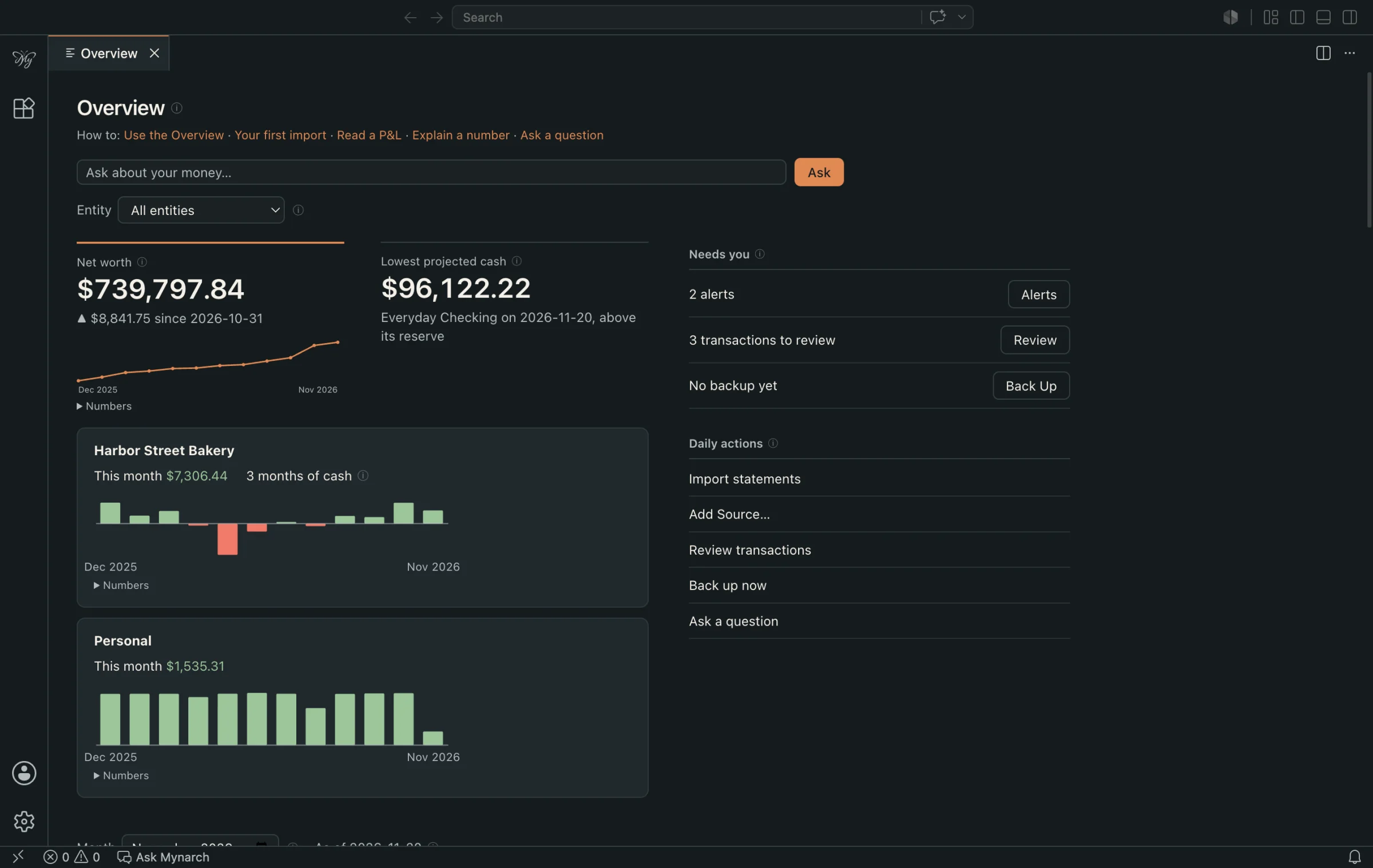
The overview. Every screenshot on this page is the real app with made-up sample data.
A real P&L for each business, and for you
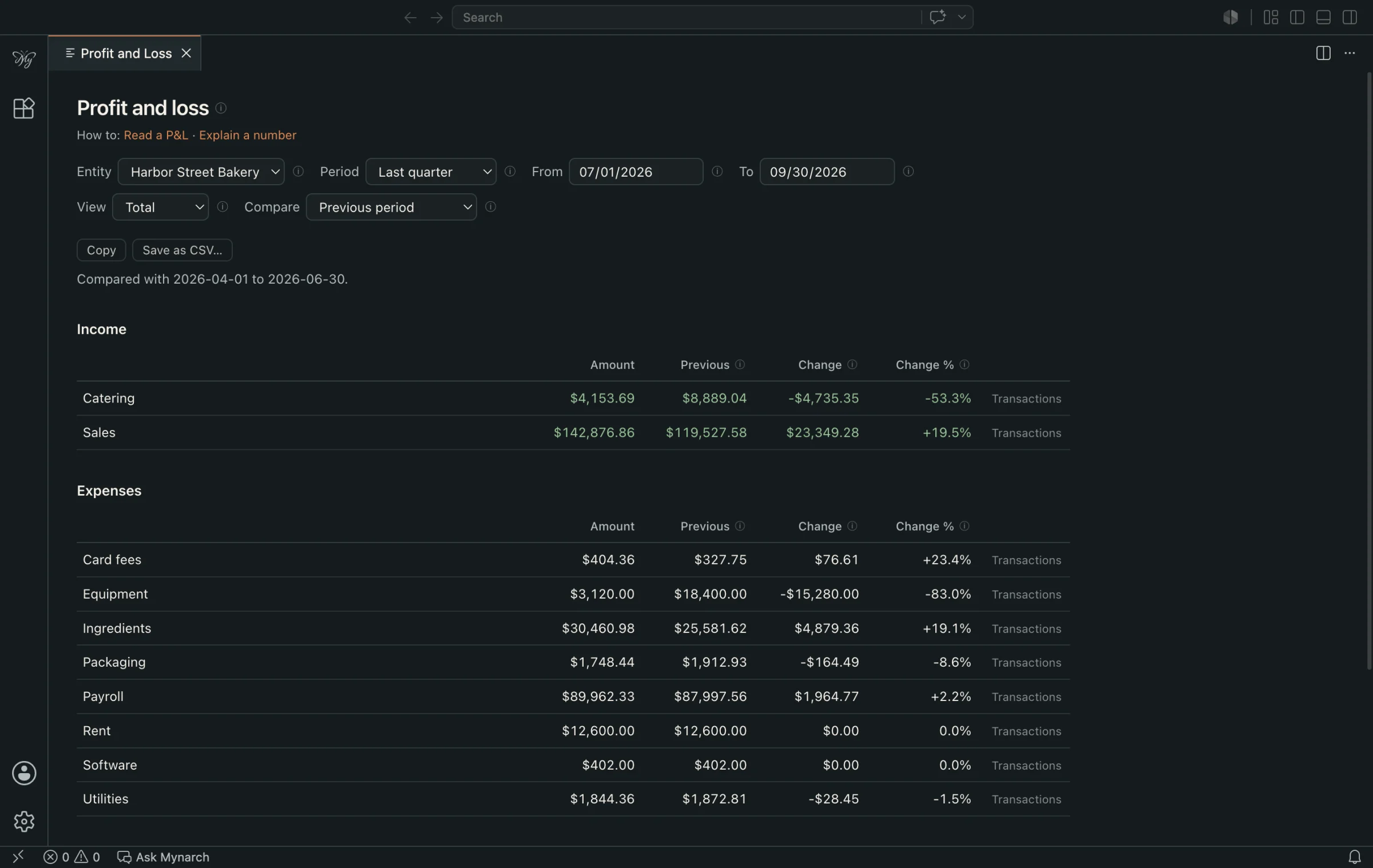
By category, by month, or against the period before. Money you move between yourself and a business is an owner's draw or contribution, never income or an expense, so neither side is inflated.
Right-click any figure and Explain this lists the transactions behind it and checks that they add up.
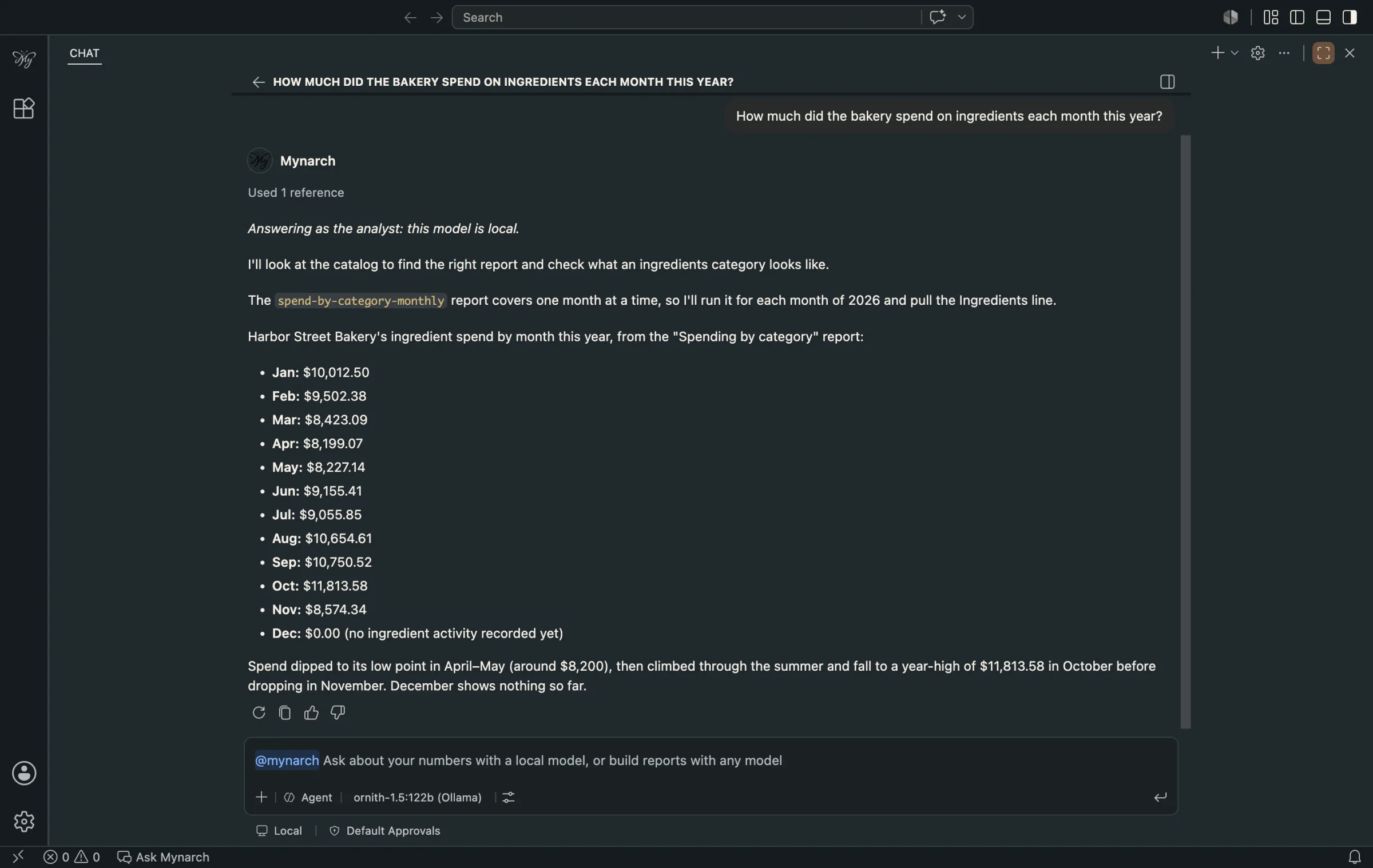
Ask in plain words
Type a question. A model running on your own Mac picks the report and explains what came back. The numbers come from the report, not from the model, and nothing it reads leaves your computer.
No model at all? Every page, report and chart works without one.
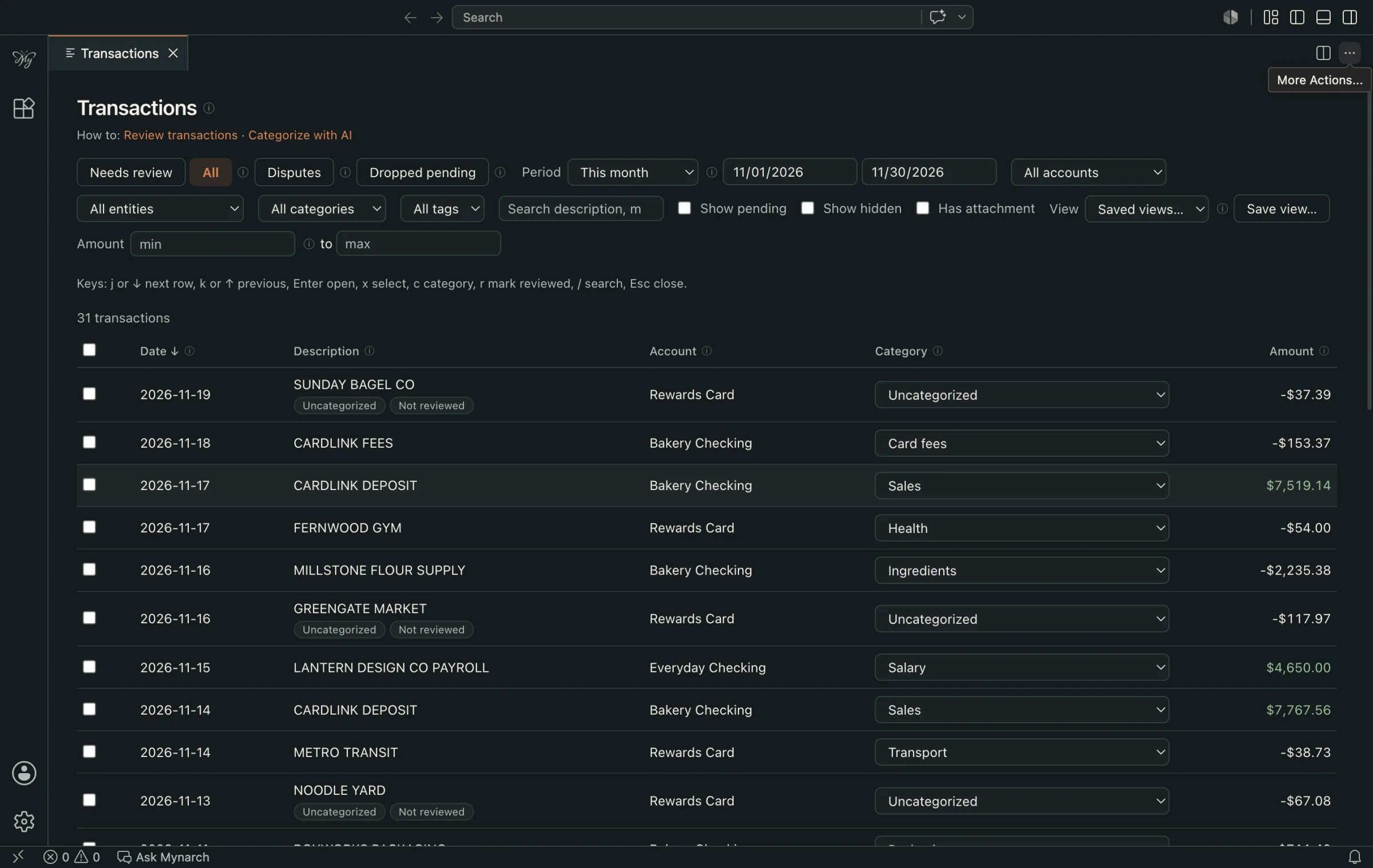
Drop in statements. Fix a category once.
Download statements from your bank or card and put them in a folder. Mynarch reads CSV, OFX, QFX and text PDF files, so it never holds a bank login.
Duplicates are caught, transfers and loan payments are kept out of income and expenses, and a rule remembers every category you correct.
Where your data goes
Most finance apps ask for your bank login and keep your transactions on their servers. Mynarch works the other way around.
Stays on your Mac
- The ledgerOne encrypted database. Without your key it is unreadable.
- Statements, receipts and attachmentsEncrypted as soon as they are imported.
- Every report resultBalances, payees, amounts and account numbers.
- Your questions and the answersA local model reads results on your computer and nowhere else.
- BackupsEncrypted files you save wherever you choose.
Leaves your Mac
Nothing.
No account, no cloud sync, no usage tracking, no update pings. The app makes no network calls except to the AI model you set up.
If you choose to add an online model such as Claude, it receives the layout of the tables and the question you typed, after you approve a preview of exactly what will be sent. It never receives a row, a balance, a payee or an account number.
And the rest of it
Built for people who run a household and a business or two, and want one honest picture of all of it.
- Personal and business, kept apart
- Every account belongs to you or to a named business. Money you move between them is recorded as an owner's draw or contribution, never as income or an expense, so neither P&L is inflated.
- Profit and loss you can question
- By category, by month, or against the previous period. Explain this on any figure lists the transactions behind it and checks that they add up.
- Net worth, assets and loans
- Houses, cars and equipment with dated valuations, and loans with a real amortization schedule that splits each payment into principal, interest and escrow.
- What happens next
- Recurring bills found for you, projected balances, budgets, goals, invoices and bills, and what-ifs such as paying off a loan or dropping a subscription.
- Tax time and month-end
- A tax summary by line, payee totals for 1099s, and a set-aside target for estimated taxes. Close a month and Mynarch warns you if its numbers change later.
- Buying a business
- See how much capital you could bring to an acquisition, then model a deal's price, debt and cash flow to see whether it covers its payments.
- Alerts that watch for you
- Duplicate charges, unusually large ones, price increases on subscriptions, budgets running over and balances heading below your reserve.
- Receipts and investments
- Drop receipts in a folder and match them to transactions. Track holdings, cost basis and realized gains from your brokerage's positions file.
- Locked down
- An encrypted ledger, a recovery key, encrypted backups, an optional PIN screen, and a full history with undo for every change.
Two kinds of AI, with two different jobs
Models never read your tables directly and never do the arithmetic. Every figure comes from a saved report that you can open and inspect.
The analyst
A model on your own Mac, through Ollama
- Runs reports and explains the results in plain language
- Suggests categories for you to approve
- Explains why an alert fired
- Reads the total and date from a receipt photo
The builder
An online model such as Claude, if you want one
- Writes new reports and queries from the table layout alone
- Never sees a result, a row or a balance
- Shows you exactly what will be sent before the first message
- Off until you add your own API key
Questions
Does any of my financial data leave my Mac?
No. The ledger, your statements, receipts and backups are encrypted and stored on your Mac. Mynarch has no account, no cloud sync and no usage tracking, and the app makes no network calls except to the AI model you set up yourself.
Does Mynarch connect to my bank?
No. You download statements from your bank and drop them into a folder. Mynarch reads CSV, OFX, QFX and text PDF files, so it never holds your bank login.
Which banks does it work with?
Any bank or card that lets you download statements as CSV, OFX, QFX or a text PDF. Chase checking and Relay business exports are recognized out of the box. For anything else you map the columns once and Mynarch remembers the format.
Do I have to use AI?
No. Every page, report and chart works without a model. If you want to ask questions in plain language, Mynarch uses a model running on your own Mac through Ollama.
How does the AI see my data without it leaving my Mac?
A local model runs saved reports and explains the results; nothing it reads leaves the computer. The totals are computed by the reports, not by the model. An online model such as Claude is optional and only ever receives the layout of the tables and the question you typed, after you approve a preview. It never receives a row, a balance, a payee or an account number.
What do I need to run it?
A Mac with Apple silicon. For questions in plain language you also need Ollama and a local model; a model of 7 billion parameters or more works best.
Can I get my data out?
Yes. Export to CSV, Beancount or JSON at any time, and make encrypted backups that restore on another Mac with your passphrase or recovery key.
Is Mynarch financial advice?
No. Mynarch shows figures computed from your own statements, such as a tax set-aside target or an estimate of how large a business you could buy. They are estimates to help you plan, not financial, tax or legal advice.
Replace the guesswork with your own numbers.
Mynarch is nearly ready to download. Leave your email and we'll send one message when it is.